DistroKid Mastering: Specs First, Then a Clean Master
Prepare a clean master that fits DistroKid’s published upload rules, then upload the file yourself.
Upload your track
Drop your finished mix here to get started.
This page covers specs and mastering — not a DistroKid account connection and not a comparison of distributors.
Upload only audio you own or have permission to process. See Terms and Privacy.
In short
DistroKid mastering here means two jobs: read DistroKid’s own upload requirements, then finish a stereo master you are allowed to process. DistroKid’s help article “What Audio File Formats Can I Upload?” (checked 2026-11-09) lists WAV, MP3, M4A, FLAC, AIFF or Windows Media (WMA); says 16-bit, 44.1 kHz WAV is typical; caps a file at 1 GB; and limits a track under 5 hours with album total under 10 hours. A related DistroKid article recommends WAV and FLAC for best audio quality. This studio exports 24-bit WAV, dithered 16-bit WAV or 320 kbps MP3 after song credits — pick WAV when you want lossless for upload.
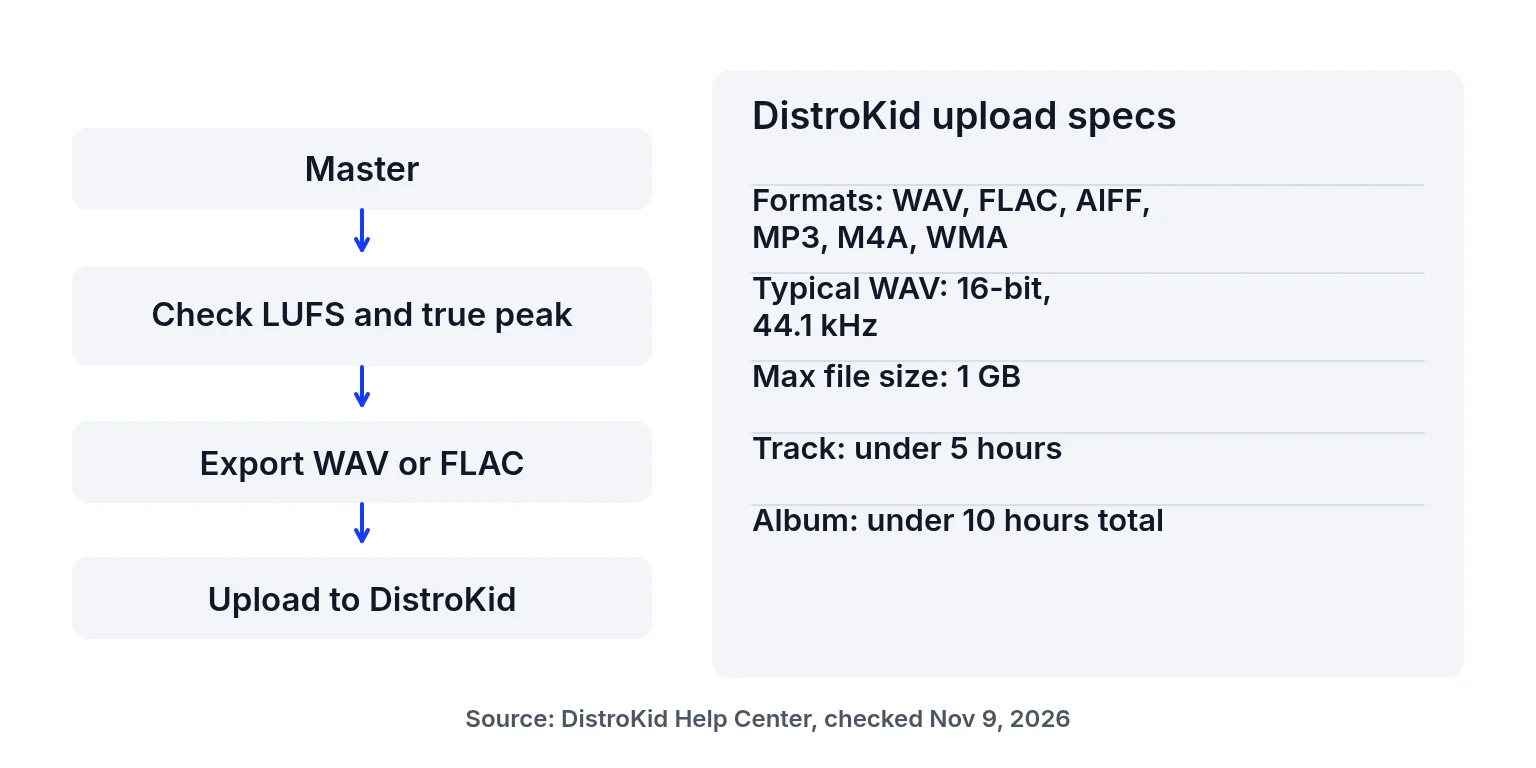
What DistroKid publishes about uploads
Use DistroKid’s help center as the source of truth; recheck before release day:
| Topic | What DistroKid’s help pages say (2026-11-09) | Source |
|---|---|---|
| Formats | WAV, MP3, M4A, FLAC, AIFF or Windows Media (WMA) | Audio file formats |
| Typical WAV | 16-bit, 44.1 kHz WAV is typical; other specs often work | same |
| Max size | 1 GB per file | same |
| Duration | Track under 5 hours; album sum under 10 hours | same |
| Quality tip | WAV and FLAC recommended for best audio quality | WAV and FLAC recommended |
This page does not compare DistroKid to other distributors, does not quote DistroKid pricing, and does not claim DistroKid endorsement.
What this studio adds before you upload
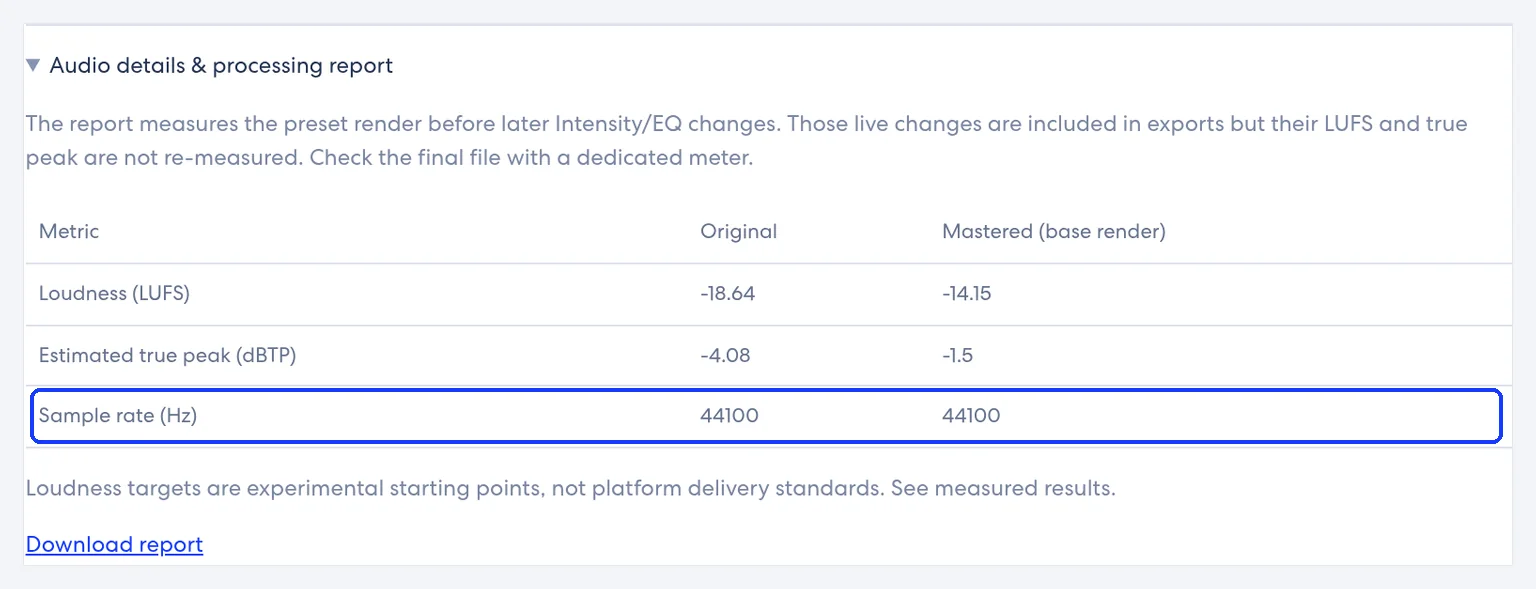
Upload your finished mix (WAV, MP3, FLAC or AIFF, up to 200 MB and 10 minutes — shorter than DistroKid’s duration cap because of this tool’s limit). Preview eight profiles free. Read Loudness (LUFS), Estimated true peak (dBTP) and Sample rate. Unlock song credits ($1.99 USD once for 5 songs) for downloads. Prefer the WAV download for a DistroKid upload when you want lossless.
DistroKid mastering without inventing loudness rules
DistroKid’s optional Loudness Normalization album extra is described on DistroKid’s own help pages; this page does not restate third-party LUFS goals as DistroKid requirements. For streaming playback figures that platforms publish themselves, use the streaming LUFS targets table. For how playback gain works, see loudness normalization.
Honest limits
- No DistroKid login or auto-upload from this site.
- No brand comparison with other distributors.
- This tool’s file cap is 200 MB / 10 minutes, even though DistroKid accepts larger/longer files.
- No FLAC export from this studio — WAV or MP3 only after credits.
- Screenshot meter readings are not targets.
How to prepare DistroKid mastering
Check DistroKid’s format and size rules
Confirm your release fits DistroKid’s published formats, 1 GB size cap and duration limits. Prefer WAV or FLAC on DistroKid’s quality advice; this studio can supply WAV after credits.
Master the finished stereo mix here
Upload a completed mix within 200 MB and 10 minutes. Pick a profile, adjust Intensity and EQ, compare Original and Mastered, and read the report.
Download a WAV and upload in DistroKid
Unlock song credits if needed, download 24-bit or 16-bit WAV, then upload that file in DistroKid yourself. Re-measure the download with a dedicated meter if you need certified figures.
DistroKid mastering checklist before you click upload
Work through this list once per release so DistroKid mastering stays a specs-and-file job, not a guess:
- Confirm the track is the final stereo version you intend to distribute, not a clipped bounce from a phone speaker test.
- Prefer WAV from this studio after song credits when DistroKid’s help recommends lossless; keep an MP3 only when a small file is required for some other use.
- Read sample rate in the report so you know whether the file stayed at 44.1 kHz or was processed at another rate this tool supports.
- Keep true-peak headroom sensible; do not treat any screenshot LUFS or dBTP reading on this site as a DistroKid delivery target.
- Upload inside DistroKid yourself; this page never claims an API or partner badge.
- If DistroKid’s help pages change formats or size caps, trust DistroKid over this article and update your export.
When DistroKid mastering is the wrong first step
Skip DistroKid mastering here if the song still needs mix balance, if a vocal is buried, or if generation artifacts dominate the bounce. Fix those upstream, then return. If you only need loudness numbers, the LUFS meter is enough before you spend a song credit. If you need platform-published streaming figures, open the streaming targets table rather than inventing a DistroKid-only LUFS rule. Album-wide extras DistroKid may offer are documented on DistroKid’s site; this guide stays on upload specs plus a clean master.
Distrokid mastering FAQ
What is DistroKid mastering on this page?
It means preparing a clean master that fits DistroKid’s published upload specs, using this studio for tone, dynamics and loudness, then uploading the file in DistroKid yourself.
Which formats does DistroKid accept?
DistroKid’s help page lists WAV, MP3, M4A, FLAC, AIFF or Windows Media (WMA). WAV and FLAC are recommended for best quality.
What sample rate should I use?
DistroKid says 16-bit, 44.1 kHz WAV is typical. This studio accepts 16–192 kHz input; rates above 48 kHz are resampled to 48 kHz for processing.
Do you upload to DistroKid for me?
No. There is no DistroKid connection. You download a master and upload it yourself.
Is previewing free?
Yes. Downloads need song credits ($1.99 USD once for 5 songs, no automatic renewal).
Can I download FLAC here?
No. Exports are 24-bit WAV, dithered 16-bit WAV or 320 kbps MP3.
Does DistroKid require a specific LUFS number?
This page does not invent one. Use DistroKid’s own help for product extras, and the streaming targets table for platform-published playback figures.
Are you affiliated with DistroKid?
No. DistroKid is a trademark of its owner. This site is not affiliated with or endorsed by DistroKid.
What about albums longer than 10 minutes per track?
Master each track that fits this tool’s 10-minute limit separately, or edit first. DistroKid’s album duration rules are separate from this studio’s cap.
Ready to check your mix?
Upload above, preview free, and unlock song credits only when you need a download. → AI music mastering
Platform names are trademarks of their owners. This site is not affiliated with or endorsed by them. Statements checked 2026-11-09 may change.
Last updated: 2026-11-09