Humanize AI Music: Three Paths Toward a More Natural Song
Make an AI song feel less stiff by improving texture, improving the performance, or involving a person.
Upload your track
Drop your finished mix here to get started.
Upload only audio you own or have permission to process. See Terms and Privacy.
This page is a method guide. This site does not sell a “humanizer” product or a human-percentage score.
To humanize AI music, pick the path that matches the problem. If the arrangement is fine but the tone feels harsh or flat, mastering can shape overall tone, dynamics and loudness on the finished stereo file. If the vocal phrasing, timing or melody still sounds robotic, go back to the generator or record a person. Mastering cannot rewrite lyrics, replace vocals or reliably repair severe generation artifacts, and it cannot tell you what percentage of a song is “human.”
For pricing and downloads, open the mastering tool.
Before you begin
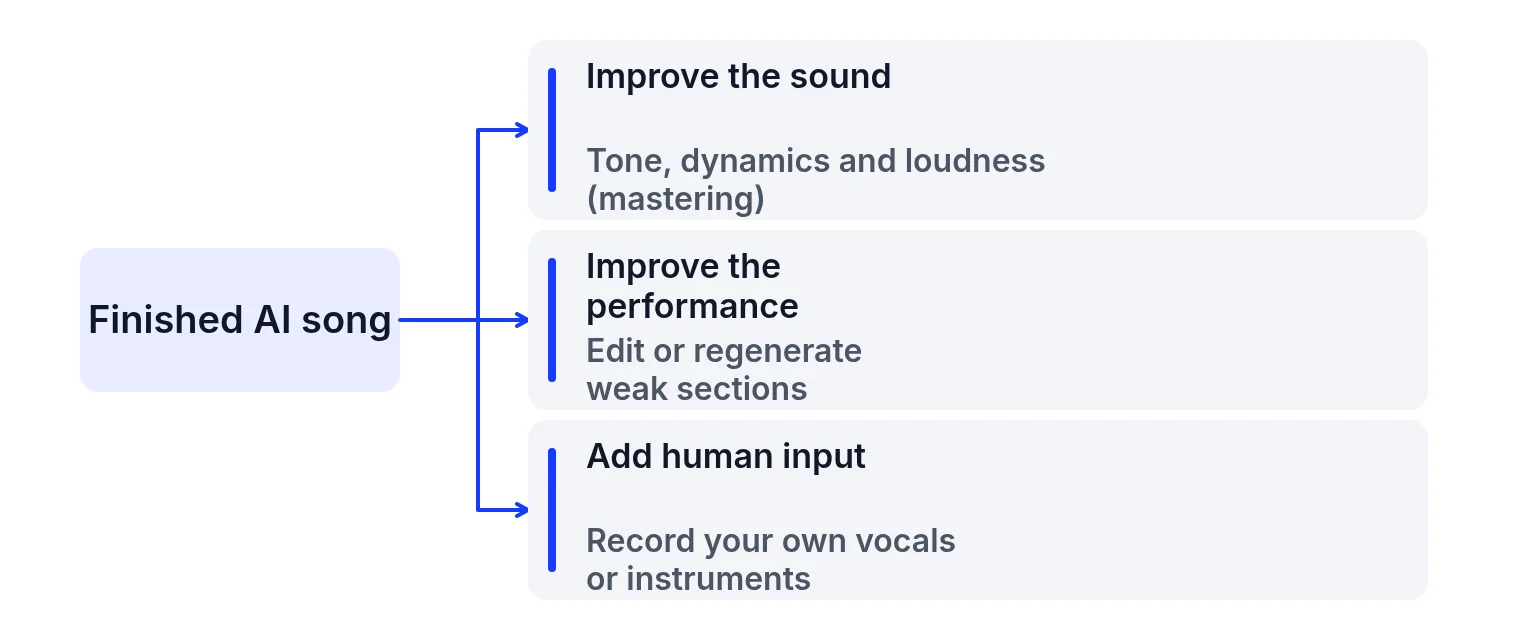
People searching for ways to humanize AI music usually want one of three things:
1. A warmer, less plastic tone on a finished export.
2. More natural phrasing — breaths, timing, vibrato, lyric clarity.
3. A real human performance on top of, or instead of, the generated vocal.
Those are different jobs. Mixing a soft vocal is not the same as mastering a finished bounce, and neither is the same as hiring a singer. The rest of this page keeps those jobs apart so you do not expect one upload to solve all three.
Path 1: Improve texture on the finished mix
Use this path when the song’s structure is acceptable and the main complaint is harsh highs, a thin midrange, lifeless dynamics or awkward loudness. Mastering works on the whole stereo file: overall tone, dynamics and loudness. On this site you upload a completed mix, choose one of eight sound profiles (Universal, Fire, Clarity, Tape, Natural, Spatial, Cinematic or Punch), adjust Intensity and a three-band EQ, then compare Original and Mastered. Previewing is free. Song credits unlock downloads.
What this path can do:
- Soften a piercing top end or lift a dull midrange with EQ after a profile.
- Glue peaks and raise integrated loudness with the tool’s limiter.
- Give you a delivery file in 24-bit WAV, dithered 16-bit WAV or 320 kbps MP3 once a song is unlocked.
What this path cannot do:
- Rewrite a robotic vocal line or add breaths the generator never wrote.
- Separate a buried vocal from a loud pad once everything is bounced.
- Promise that the result “sounds human” by any percentage.
If you only need to read loudness before you decide, use the LUFS meter. For the order of work, see how to master a song.
Path 2: Improve the performance in the generator
Use this path when the problem lives in the performance itself: clipped words, metallic consonants, random timing, empty emotion or wrong lyric stress. Those decisions are made when the song is generated. The honest fix is usually to regenerate, extend, or replace sections in the tool that made the song (for example Suno mastering starts from a Suno export or supported link).
Practical moves that stay outside this mastering studio:
- Regenerate the weak section with clearer lyric structure and fewer conflicting style tags.
- Export the highest-quality file the generator offers; converting an MP3 to WAV does not restore lost detail.
- If stems are available in that tool, fix balance in a DAW before you master — see mixing versus mastering.
Mastering after a better export still helps texture. It does not undo a bad take.
Path 3: Involve a human
Use this path when you want a real voice, real guitar, or real drums on the record. That can mean recording a singer over an instrumental, replacing a generated lead, or hiring a mixer. This site does not offer human session work, vocal tuning services, or a “AI to human converter.” If that is what you need, plan time and budget outside the automated studio, then bring the finished stereo mix back here if you still want a master.
How to humanize AI music in 3 steps (texture path)
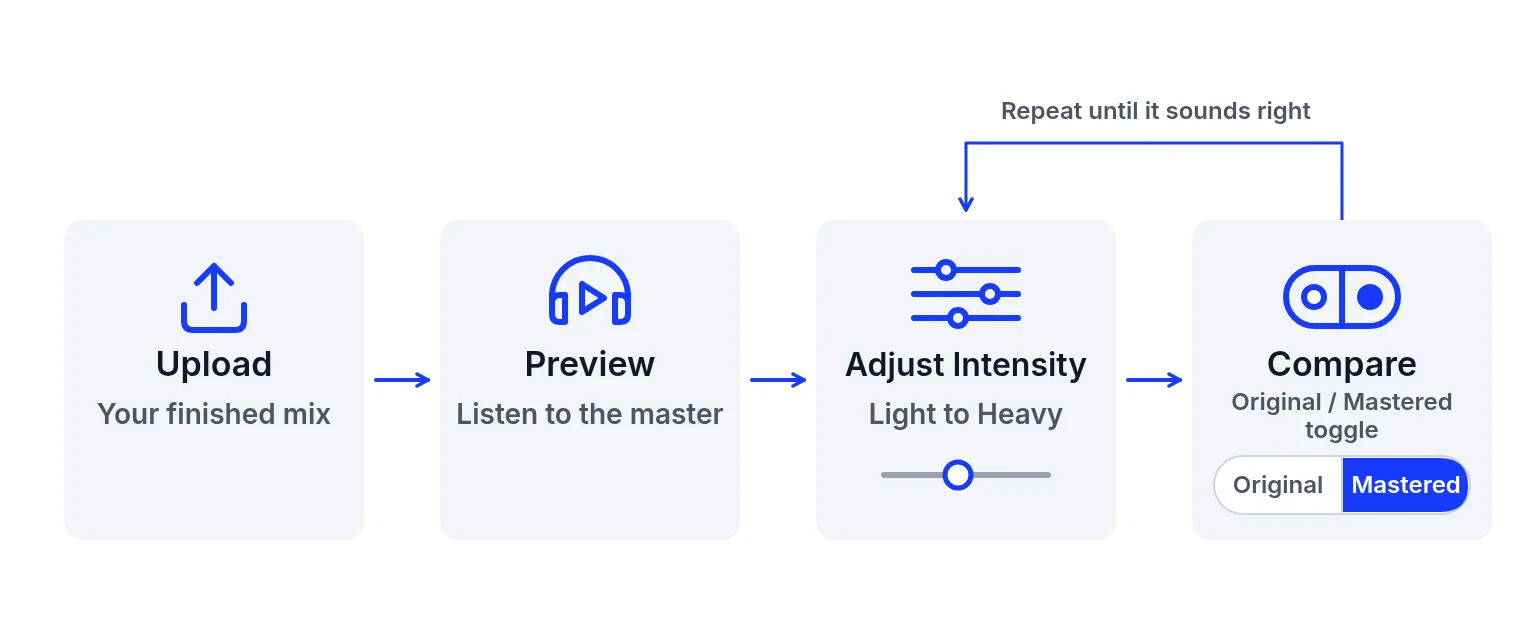
Confirm the mix is finished
Balance the vocal and instruments first. If one part masks another, fix that before mastering. Upload a completed mono or stereo mix as WAV, MP3, FLAC or AIFF, up to 200 MB and 10 minutes.
Preview profiles and listen honestly
Start with Universal or Natural. Hear a quiet verse and a busy chorus. Original and Mastered play at their own levels; this studio has no visible loudness-matching control. A louder result is not automatically more natural.
Adjust lightly, then export if you unlock the song
Nudge Intensity or EQ only after you have listened. Free accounts can preview. Unlocking a song with song credits ($1.99 USD once for 5 songs, no automatic renewal) enables downloads for that import. Reference matching is free and can guide tone and loudness from another track you have permission to use; it still does not copy vocals or arrangement.
Common problems and what to check
Online tools sometimes promise to “humanize” or “de-AI” a song in one tap. This page does not. The site’s own description is preset-based DSP for finished mixes: it shapes tone, dynamics and loudness. It is not a trained model that scores how human a vocal is, and the FAQ states it cannot rewrite lyrics, replace vocals or reliably repair severe generation artifacts. For metallic hiss and generation damage specific to Suno exports, read fix Suno audio artifacts.
| Problem | Likely cause | What to check |
|---|---|---|
| No human-percentage score | Nothing on this site measures or sells “% human.” | The upload and the report do not produce a human score. |
| No full Humanizer product | There is no one-button repair that rebuilds phrasing, timing or vibrato. | Pick texture, a new generation, or a person. This site does not sell a humanizer. |
| Mastering is whole-mix only | It cannot turn up one word without affecting everything in that band. | A quiet word or a buried vocal has to be fixed before the bounce. |
| Severe artifacts may remain | Light EQ can soften harshness; clipped or broken generation often needs a new render. | If the damage is still the main event, regenerate. See fix Suno audio artifacts. |
| Reference matching treated as a clone | It guides tone and loudness from a permitted file. It does not copy vocals, melody or arrangement. | Reference matching is free and does not spend a song credit. The studio still labels it Beta. It can guide tone and loudness from another permitted song without copying vocals, melody or arrangement. Free accounts see their latest 5 saved songs. A purchased song pack, or an active membership, shows the full saved list. |
| Stems, vocal isolation, or a hired singer | This site does not split stems, isolate a vocal, or book a singer. | Arrange that yourself, then bring a finished mix back. |
Check the finished file
- The arrangement is acceptable, and the complaint is harsh highs, a thin midrange, lifeless dynamics, or awkward loudness. That is the texture path.
- You listened to a quiet verse and a busy chorus. Original and Mastered play at their own levels. A louder result is not automatically more natural.
- Intensity and EQ moved only after that listen.
- If you unlock the song, the download is 24-bit WAV, dithered 16-bit WAV, or 320 kbps MP3. Song credits are $1.99 USD once for 5 songs, with no automatic renewal.
- If phrasing, timing, lyric clarity, or emotion is still wrong, regenerate or record a person instead of expecting the master to rewrite the vocal.
Ready to improve the texture?
Upload a finished mix above, try a profile, and listen before you unlock a download. → AI music mastering
Humanize AI music FAQ
What does it mean to humanize AI music?
It usually means making an AI song feel less stiff: warmer tone, better dynamics, clearer loudness, or a more natural performance. Tone and loudness can be addressed on a finished mix; phrasing and emotion often need a new generation or a human take.
Can this site humanize AI music automatically?
It can master a finished mix with profiles, Intensity and EQ, and you can preview free. It does not offer a dedicated Humanizer, a human score, or vocal rewriting.
Will mastering make my AI vocals sound human?
It can change how the whole mix feels. It cannot rewrite a robotic vocal, add missing breaths or guarantee a natural performance.
Should I remaster or regenerate?
Remaster when the arrangement is fine and the problem is tone, dynamics or loudness. Regenerate when lyrics, timing or vocal character are wrong.
Does reference matching humanize a song?
No. Reference matching guides tonal balance and loudness from a permitted reference. It does not copy melodies, arrangements or individual instruments.
Is previewing free?
Yes. Uploading, eight sound profiles, Intensity, EQ, original/mastered previews and reference matching are free. Downloads need song credits.
What files can I upload?
WAV, MP3, FLAC or AIFF, up to 200 MB and 10 minutes, mono or stereo.
Can mastering remove Suno artifacts?
Not reliably for severe ones. Softening harsh highs is sometimes possible; broken generation usually needs a new export. See the artifacts guide.
Do you offer human singers or mixing engineers?
No. Path 3 is something you arrange yourself, then you can bring a finished mix back for mastering.
Related links
- The mastering upload: preview a finished mix before you unlock a download.
- A Suno link or file: the import path when the song started in Suno.
- Metallic sound and hiss: what a stereo master will not repair.
- Balance or the whole-mix finish: which stage the problem belongs to.
- Step-by-step mastering order: EQ, compression, limiting, then loudness.
- The loudness report, in more detail: read LUFS before you decide the texture is the problem.
Last updated: 2026-11-10