True Peak Limiter: Peaks Between Samples, Explained
A true peak limiter aims to catch peaks that appear between digital samples — not only the tallest stored sample.
Upload your track
Drop your finished mix here to get started.
Upload only audio you own or have permission to process. See Terms and Privacy.
Upload a mix to read estimated true peak here.
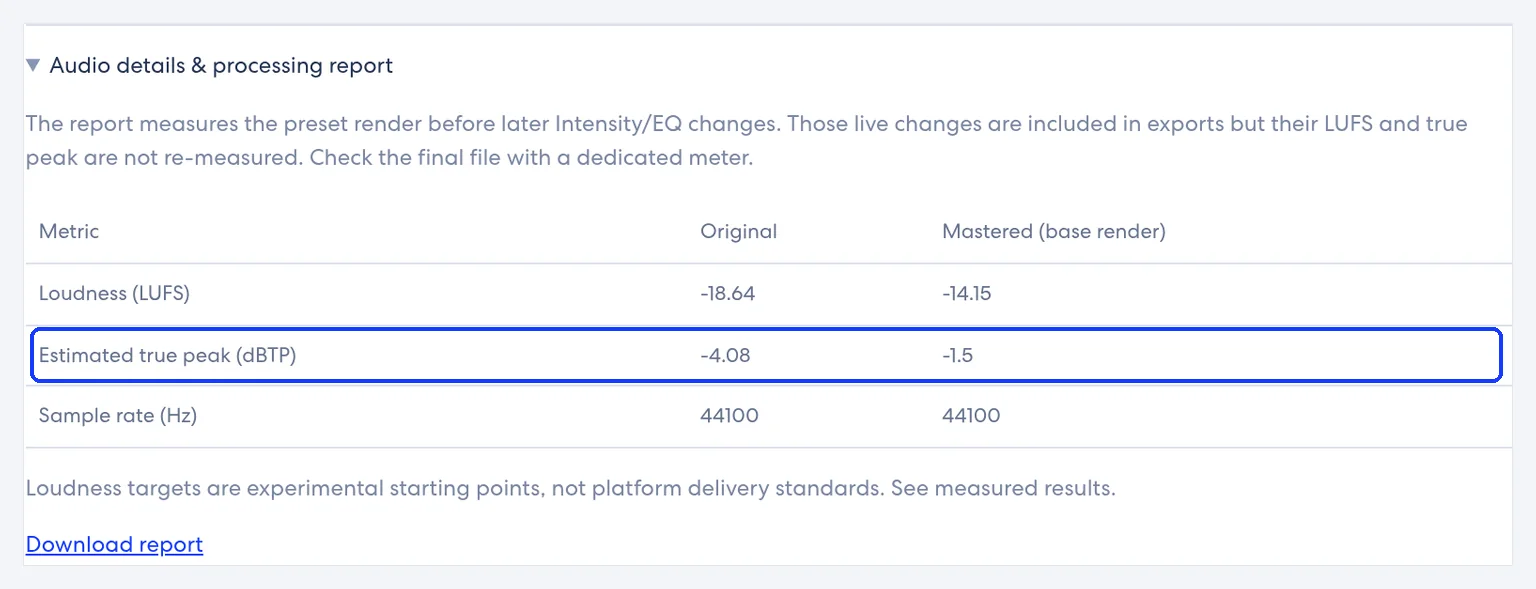
A true peak limiter is a limiter that considers inter-sample peaks. EBU R 128 defines Maximum True Peak Level as the maximum of the audio signal waveform in continuous time, and states a programme shall not exceed −1 dBTP for its broadcast target context. Music streaming pages that publish advice (for example Spotify) often ask for true peak below −1 dBTP, or lower when the master is very loud — see those rows in streaming LUFS targets. This studio reports Estimated true peak (dBTP) from a four-times oversampled estimate; it is not a certified meter.
For pricing and downloads, open the mastering tool.
Before you begin
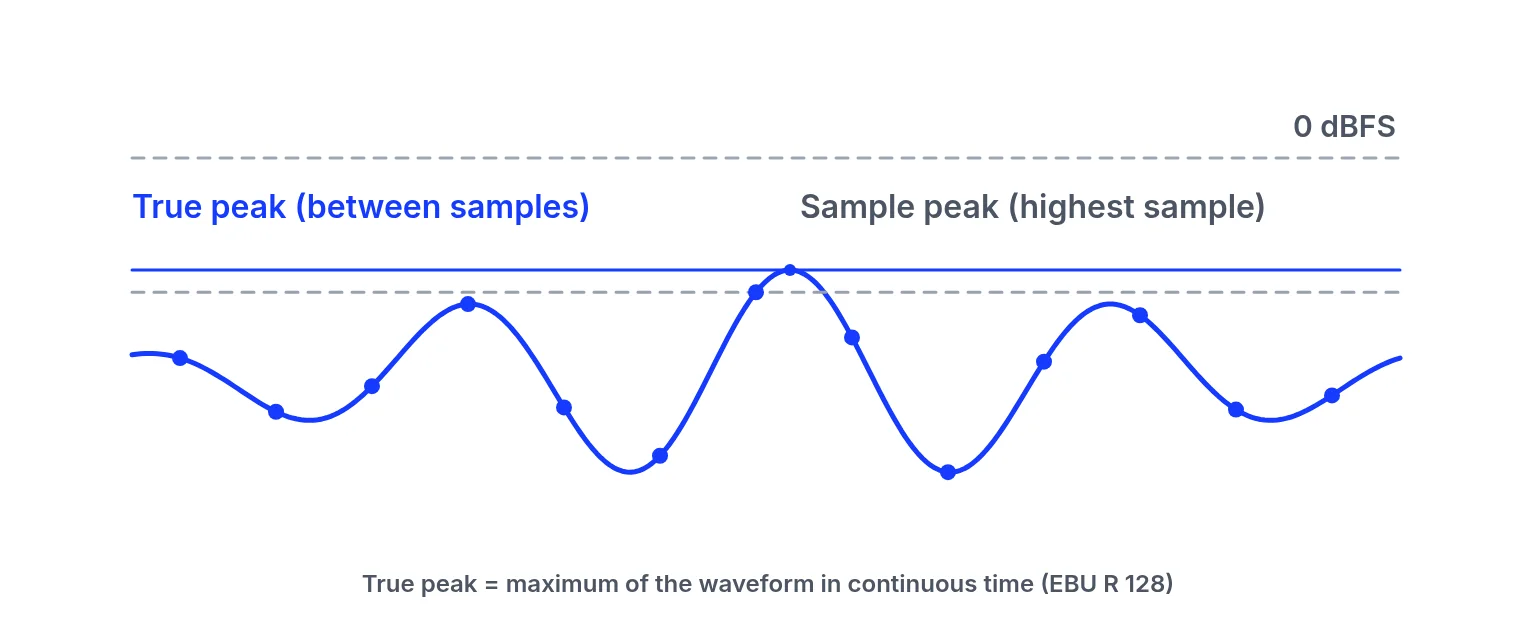
Sample peak is the largest stored sample. After reconstruction or lossy encoding, the continuous waveform can overshoot. That overshoot is why true-peak metering and true-peak limiting exist. Apple’s Digital Masters guide warns that going past 0 dBFS causes clipping distortion and loss of dynamic range, and recommends at least 1 dB of headroom.
The engine includes limiting on the base render, and the ceiling is not user-adjustable. The studio UI does not expose separate limiter ceiling or release knobs. What you adjust is Intensity (and EQ), which changes how hard the chain works. Do not describe per-control limiter settings that are not in the UI. Preview free; downloads need song credits.
If a stem still clips before the bounce, fix the mix. Limiting a clipped file rarely removes the distortion; it often makes the damage more consistent. Keep creative decisions upstream, then use limiting as a ceiling tool—not a mix repair.
Lossy encoders can create additional inter-sample peaks even when a WAV looked safe. Oversampled true-peak meters catch more of those events than a simple sample-peak read. This site’s four-times estimate is a teaching and preview aid, not a substitute for the meter your distributor or plant specifies. After you unlock a download, run that offline meter before you archive the release. If two meters disagree, match settings (BS.1770 version, true-peak oversampling) before you change the master again.
Even though the report is not a certified meter, watching Estimated true peak while you raise Intensity teaches you when the master is running out of headroom. If the estimate climbs toward full scale while the mix starts to sound smaller, back off. Export, then verify with a dedicated meter when a label or plant requires paperwork. That is the honest true-peak workflow on a site that does not expose ceiling dials.
Spotify’s public pages ask for true peak below −1 dBTP in general mastering tips, and below −2 dBTP when a master is louder than −14 dB LUFS. SoundCloud publishes similar numeric advice on its loudness help page. Other platforms may publish none. A true peak limiter (or this engine’s fixed limiting) helps you obey a ceiling you chose; it does not invent a platform law where none exists. Cross-check the streaming LUFS targets table before you obsess over a single number.
When you reach for true-peak limiting in a DAW, you usually set a ceiling under full scale, choose a release that does not pump the groove, and check both sample peak and true peak after encoding. In this browser studio the mapping is simpler: profiles plus Intensity. Treat the educational ceiling/release diagram as vocabulary, not as hidden knobs.
How to check true peak before limiting decisions
Measure sample behaviour on your file
Upload the finished mix. Read Estimated true peak (dBTP) and Loudness (LUFS) for Original and Mastered.
Audition Intensity carefully
Raise Intensity only while listening for pumping or dullness. There is no separate ceiling knob to twist.
Verify the download if delivery is critical
Unlock a WAV when needed, then check the file in a dedicated true-peak meter before release.
Common problems and what to check
| Problem | Likely cause | What to check |
|---|---|---|
| Sample peak and true peak disagree | The peak can fall between samples, above the tallest stored sample. | Read Estimated true peak (dBTP), not only the largest sample. |
| The estimate is treated as certified | Estimated true peak is a four-times oversampled estimate, not a certified delivery meter. | After you unlock a WAV, check the file in a dedicated true-peak meter before release. |
| A screenshot number becomes the goal | Numbers on the report image are a synthetic test reading, not a recommended target. | Measure your own file. |
| Broadcast −1 dBTP treated as a pop-streaming law | EBU R 128 uses that figure in its broadcast programme rules. Music platforms differ. | Only what a platform publishes. See streaming LUFS targets. |
| A clipped stem before the bounce | Limiting a clipped file rarely removes the distortion. It often makes the damage more consistent. | Fix the mix. Keep creative decisions upstream. |
| Looking for ceiling and release knobs | The studio UI does not expose them. The ceiling is not user-adjustable. Intensity is what you move. | Do not describe per-control limiter settings that are not in the UI. |
Check the finished file
Upload a dynamic mix, note estimated true peak at Intensity 50, raise Intensity once, note the new estimate, then listen for pumping. Stop when loudness gains cost punch. That loop teaches more than copying a ceiling number from a forum post. Pair it with how to use a limiter for ceiling and release vocabulary, and with the streaming table for platform-published advice only.
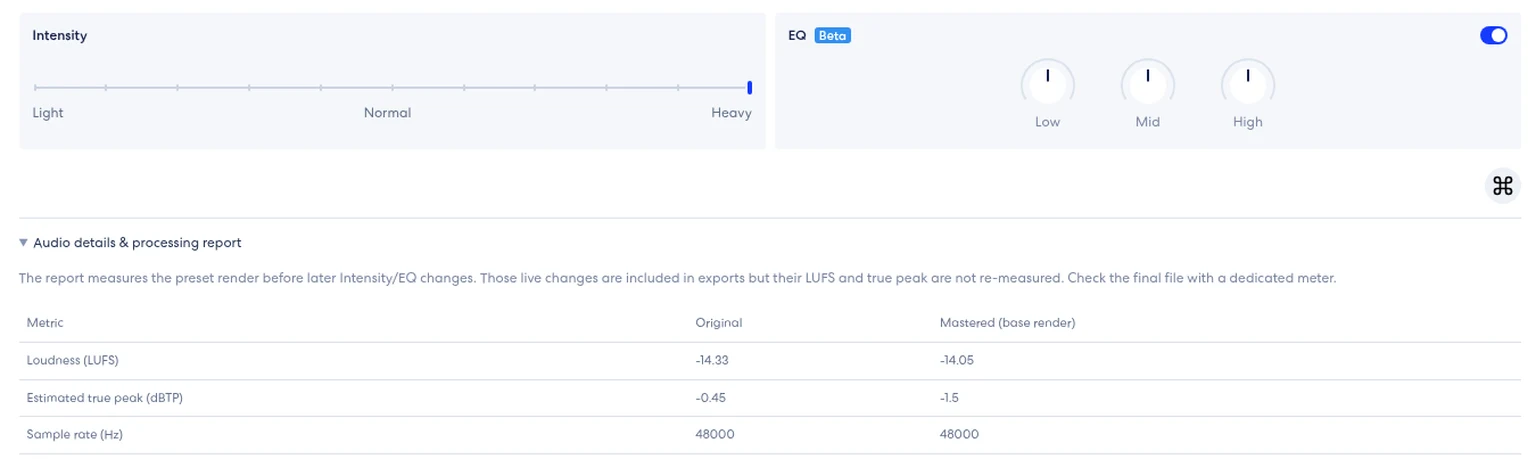
- Read Estimated true peak and Loudness (LUFS) for Original and Mastered.
- Raise Intensity only while listening for pumping or dullness.
- If the estimate climbs toward full scale while the mix starts to sound smaller, back off.
- Unlock a WAV when delivery paperwork matters, then verify in the meter your distributor or plant specifies. If two meters disagree, match settings (BS.1770 version, true-peak oversampling) before you change the master again.
Ready to check your mix?
Upload above, preview free, and unlock song credits only when you need a download. → AI music mastering
True peak limiter FAQ
What is a true peak limiter?
A limiter designed with inter-sample peaks in mind, so the continuous waveform stays under a ceiling—not only the stored samples.
What is dBTP?
Decibels true peak: a true-peak level reading.
Does this site show true peak?
Yes — Estimated true peak (dBTP) in the processing report. It is an estimate.
Can I set the limiter ceiling myself?
No separate ceiling or release controls appear in the studio UI. Intensity is the main strength control.
What ceiling does the engine use?
The studio does not show a ceiling control or publish a ceiling value. Measure the true peak of your downloaded file and compare it with the platform you are delivering to.
What do streaming services ask for?
Only what they publish. Spotify and SoundCloud publish numeric true-peak advice; several others do not. See the streaming table.
Is previewing free?
Yes. Downloads need song credits.
Is −1 dBTP always required?
EBU R 128 uses −1 dBTP in its broadcast programme rules. Music platforms differ. Do not invent numbers.
Why do my sample peak and true peak differ?
Because the peak can fall between samples.
Related links
- Published streaming figures: only the true-peak advice each service actually prints.
- Ceiling and release as ideas, then Intensity: the controls this studio actually has.
- Measure your own file: upload, preview free, and unlock song credits only when you need a download.
Platform names are trademarks of their owners. This site is not affiliated with or endorsed by them. Statements checked 2026-11-09 may change.
Last updated: 2026-11-10